Built for cafés, restaurants & more

The ordering system your team will actually use.

Mobile-first par tracking, AI-suggested orders, bilingual English & Spanish — snap a photo of your product list to get started in minutes. No POS integration or recipe entry required.

No credit card to start $49 per location / month Cancel anytime
Trusted in real kitchens
$49
per location · monthly
14
day free trial
2
languages, side by side
vendors per location
What's inside

The little things that save the morning.

Every feature in Parstock comes from a real café tradeoff — fewer taps, fewer errors, fewer 6 a.m. phone calls about the cream order.

Feature 01 · AI Order Review

Pre-filled orders, grouped by vendor.

Open the app, tap once. Parstock looks at your par levels, recent counts, and ordering history, and hands you a ready-to-review draft — already split by vendor, already accounting for what's on the way.

  • Smart suggestionsBelow-par items prioritized, with quantities you can override in one tap.
  • Same-vendor aggregationOrder across categories, sent as one clean order per vendor.
  • Drafts you can trustSaved automatically, ready when you walk back to the office.
Feature 02 · Mobile inventory

Counting that fits in a back pocket.

The kitchen is moving. Your inventory tool should keep up. Tap through products, type a number, move on. Below-par items surface on top, stale counts get flagged, and everything saves the moment you breathe.

  • Par-aware filters"Below par" and "Needs counting" chips at the top of every list.
  • Unit-aware mathCount in cans, order by case — Parstock handles the conversion.
  • Stale count tileKnow which items haven't been touched in a week — before the vendor does.
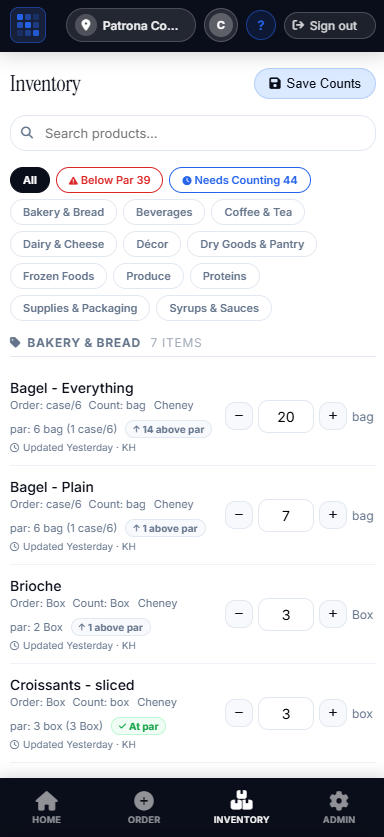
Parstock mobile inventory screen showing the Bakery & Bread category with Below Par and Needs Counting filters, per-item par status, and unit-aware counts.
Feature 03 · Delivery confirmation

What arrived — down to the last case.

When the truck shows up, confirm what you actually received, item by item. Inventory updates automatically. Discrepancies stay attached to the order so the credit conversation has receipts.

  • Per-item received quantitiesMark short-shipped items right at the back door.
  • Auto inventory updateStock adjusts the moment delivery is confirmed — no double entry.
  • Searchable order historyHybrid search across vendors, dates, items — find any past order in seconds.
Feature 04 · Backup vendors

A backup plan, built into the order.

Add one or more alternate suppliers to any product. When your primary can't deliver — or just isn't on today's schedule — Parstock automatically routes the suggestion to a backup that can. No re-typing, no panicked text messages.

  • Smart auto-routingAI Order Review picks the right vendor based on who's scheduled today.
  • Pack sizes that match realityEach backup carries its own case sizes — order math stays correct.
  • Optional, per productAdd backups for the items where availability matters most. Skip the rest.
Feature 05 · Implementation

Skip the setup. Live by lunch.

Most inventory software comes with a project plan. Parstock comes with an empty list and a phone — your first order is also your setup. Snap a photo of the product list you already have, review what the AI reads in, and you're ordering.

  • No POS integrationNo recipe builder, no variance models, no historical CSV imports.
  • No implementation consultantNo 90-day onboarding plan. Just your phone and a product list.
  • Snap your listPrinted, handwritten, an invoice, even a whiteboard — the AI reads it into products you review.
New · Bilingual

English in the office. Español en la cocina.

Every team member uses Parstock in the language they actually speak. Same orders, same inventory, same data — translated automatically when products are added, with manual edits sticky for the words that matter.

  • Auto-translate on save. New products instantly available in both languages.
  • Manual translations stick. Override anything — your team's words win.
  • Per-user preference. Each person picks their own language. The data stays one.
Category
Produce · 9
Product
Heirloom Tomatoes Lb · Par 18
Product
Whole Milk Gal · Par 8
Status
12 items below par across 4 vendors
Action
Save Counts
How it works

How ordering should work.

From first count to confirmed delivery — Parstock follows the rhythm of your kitchen.

STEP 01

Count

Walk the line with your phone. Tap through products, type quantities. Below-par items rise to the top.

STEP 02

Review

Parstock drafts your order — pre-filled by AI, grouped by vendor, ready in one tap.

STEP 03

Submit

One submit sends to every vendor at once — email, SMS, or both. Drafts auto-save while you work.

STEP 04

Receive

Confirm what arrived. Inventory updates automatically. Discrepancies stay tied to the order.

Customer story

How Patrona Coastal Café runs ordering.

154 products, 7 vendors, a team working in English and Spanish — one organized system, with reorder prompts that catch what used to slip.

Read the Patrona story
154
products in one catalog
7
vendors ordered from
2
languages, per user
Simple pricing

One price. Everything included.

No tiered traps. No "contact sales." No surprise fees when you add a vendor.

Per location

Parstock Standard

$49per location · per month
Billed monthly. Cancel anytime.
  • Unlimited products, vendors, and orders
  • AI Order Review with par-aware suggestions
  • Bilingual English / Spanish, per-user
  • Mobile inventory with par tracking
  • Delivery confirmation & auto inventory update
  • Backup vendors with automatic order routing
  • Photo-to-product import — set up from a snapshot
  • Searchable order history, draft sync, multi-location
  • Email support, weekly product updates
Start 14-day free trial
No credit card required · Cancel anytime
Ready when you are

Tomorrow's order, started tonight.

Parstock takes about 20 minutes to set up and pays for itself the first time it catches an item before it hits zero.